Phát triển kiểm thử đơn vị C++ với Catch2, JUnit và GitLab CI
Việc tích hợp liên tục (CI) và kiểm thử tự động đóng vai trò then chốt trong quy trình DevSecOps, giúp các nhà phát triển phần mềm phát hiện lỗi sớm, nâng cao chất lượng mã nguồn và tối ưu hóa quy trình phát triển.
Trong hướng dẫn này, bạn sẽ học cách thiết lập kiểm thử đơn vị cho dự án C++ sử dụng Catch2 và GitLab CI để thực hiện tích hợp liên tục. Bạn cũng sẽ trải nghiệm các tính năng AI được hỗ trợ bởi GitLab Duo giúp cải thiện quá trình này. Chúng ta sẽ dùng ứng dụng giám sát chất lượng không khí làm dự án tham khảo.
Yêu cầu chuẩn bị
- Bạn cần cài đặt CMake trên máy.
- Cần có trình biên dịch
C++hiện đại như GCC hoặc Clang. - Lấy API key từ OpenWeatherMap – yêu cầu đăng ký tài khoản miễn phí (bao gồm 1,000 cuộc gọi mỗi ngày).
Thiết lập ứng dụng để kiểm thử
Dự án tham khảo chúng ta dùng trong ví dụ này là ứng dụng giám sát chất lượng không khí lấy dữ liệu từ API OpenWeatherMap dựa trên mã zip U.S do người dùng cung cấp.
Các bước thiết lập:
- Fork dự án tham khảo và clone bản fork về môi trường local.
- Tạo API key từ OpenWeatherMap và đặt biến môi trường:
export API_KEY="YOURAPIKEY_HERE"
- Hoặc thêm key vào file
.envvà chạysource ~/.envđể load, hoặc dùng cách khác để đưa biến môi trường vào. - Biên dịch và build dự án với:
cmake -S . -B build
cmake --build build
- Chạy ứng dụng bằng lệnh với mã zip U.S ví dụ 90210:
./build/air_quality_app 90210
Kết quả sẽ hiển thị trên terminal như sau:
❯ ./build/air_quality_app 90210
Air Quality Index (AQI) for Zip Code 90210: 2 (Fair)
Cài đặt Catch2
Ứng dụng đã thiết lập xong, bây giờ bắt đầu thêm kiểm thử với Catch2 – khung kiểm thử đơn vị native cho C++ hiện đại.
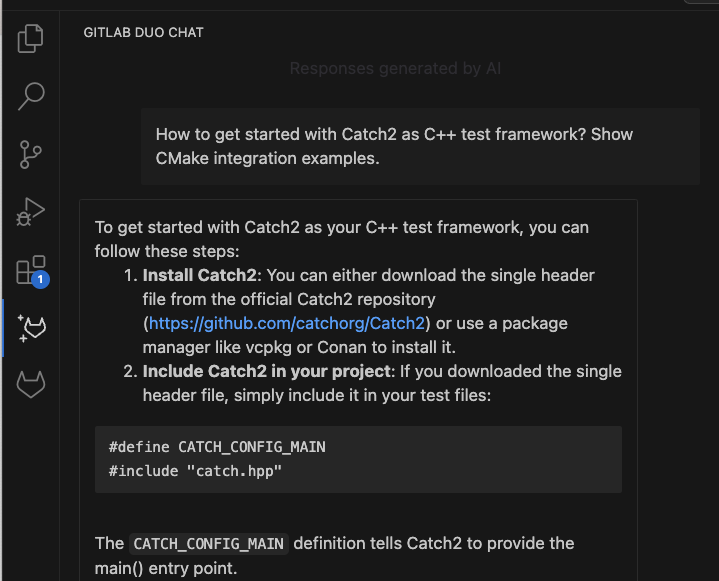
Bạn cũng có thể hỏi GitLab Duo Chat trong IDE để được hướng dẫn khởi đầu với Catch2, cùng ví dụ kiểm thử:
- Tạo thư mục externals trong thư mục gốc dự án bằng lệnh
mkdir. - Cài Catch2 dưới dạng submodule git để quản lý phụ thuộc dễ dàng:
git submodule add https://github.com/catchorg/Catch2.git externals/Catch2
git submodule update --init --recursive
- Cập nhật
CMakeLists.txtđể thêm thư mục Catch2 làm subdirectory:
# Assuming Catch2 in externals/Catch2
add_subdirectory(externals/Catch2)
- Tạo file
tests.cppở thư mục gốc để viết các bài kiểm thử. - Cập nhật
CMakeLists.txtđể liên kết test executable với Catch2:
# Add tests executable and link it to Catch2
add_executable(tests test.cpp)
target_link_libraries(tests PRIVATE Catch2::Catch2WithMain)
Cấu trúc dự án cho kiểm thử
Để quản lý và kiểm thử hiệu quả, tách logic ứng dụng ra thành các file riêng biệt. Kết quả cuối cùng gồm:
main.cpp chỉ chứa hàm main() và thiết lập ứng dụng
includes/functions.cpp chứa code chức năng như gọi API và xử lý dữ liệu
includes/functions.h khai báo hàm trong functions.cpp, với macro tiền xử lý và bao gồm các thư viện cần thiết
Áp dụng thay đổi sau:
- main.cpp (ví dụ cắt bớt):
#include#include "functions.h" int main(int argc, char* argv[]) { if (argc < 2) { std::cerr << "Please provide a US zip code" << std::endl; return 1; } std::string zipCode = argv[1]; // Application logic follows }
- Tạo
functions.htrong thư mục includes:
#ifndef FUNCTIONS_H #define FUNCTIONS_H #include#include #include // Prototype functions std::string httpRequest(const std::string& url); bool loadEnvFile(const std::string& filename); std::string getApiKey(); std::pair<double, double> geocodeZipcode(const std::string& zipCode, const std::string& apiKey); std::string fetchAirQuality(double lat, double lon, const std::string& apiKey); std::string parseAirQualityResponse(const std::string& response); #endif
- Tạo
functions.cpptrong includes, định nghĩa thực thi các hàm (ví dụ rút gọn đoạn code):
#include "functions.h"
#include <fstream>
#include <iostream>
#include <cstdlib> // getenv
#include <nlohmann/json.hpp>

#ifndef TESTING
std::string httpRequest(const std::string& url) {
   try {
       http::Request request{url};
       const auto response = request.send("GET");
       return std::string{response.body.begin(), response.body.end()};
   } catch (const std::exception& e) {
       std::cerr << "HTTP request failed: " << e.what() << std::endl;
       return "{}";
   }
}
#endif

std::pair<double, double> geocodeZipcode(const std::string& zipCode, const std::string& apiKey) {
   std::string url = "http://api.openweathermap.org/geo/1.0/zip?zip=" + zipCode + ",US&appid=" + apiKey;
   std::string response = httpRequest(url);
   try {
       auto json = nlohmann::json::parse(response);
       if (json.contains("lat") && json.contains("lon")) {
           return {json["lat"], json["lon"]};
       } else {
           std::cerr << "Geocode data missing" << std::endl;
           return {0.0, 0.0};
       }
   } catch (const std::exception& e) {
       std::cerr << "JSON parse error: " << e.what() << std::endl;
       return {0.0, 0.0};
   }
}
- Cập nhật
CMakeLists.txtđể thêmfunctions.cpptrongadd_executable():
cmake_minimum_required(VERSION 3.14)
project(air-quality-app)

set(CMAKE_CXX_STANDARD 17)
set(CMAKE_CXX_STANDARD_REQUIRED ON)
set(CMAKE_CXX_EXTENSIONS OFF)

include_directories(${CMAKE_SOURCE_DIR}/includes)

add_executable(air_quality_app main.cpp includes/functions.cpp)

add_subdirectory(externals/Catch2)

add_executable(tests tests.cpp includes/functions.cpp)
target_link_libraries(tests PRIVATE Catch2::Catch2WithMain)

# Define macro for testing
target_compile_definitions(tests PRIVATE TESTING)
Tiến hành xóa thư mục build cũ và build lại để đảm bảo mọi thứ hoạt động tốt:
rm -rf build
cmake -S . -B build
cmake --build build
Chạy lại ứng dụng kiểm tra không lỗi:
./build/air_quality_app 90210
Viết kiểm thử với Catch2
Các test trong Catch2 được cấu thành từ macro và các câu lệnh khẳng định. Macro giúp định nghĩa test case và tổ chức cấu trúc, trong khi khẳng định kiểm tra điều kiện đúng hoặc sai, nếu sai test sẽ thất bại.
Ví dụ đơn giản cho hàm cộng:
int add(int a, int b) {
   return a + b;
}

TEST_CASE("Addition works correctly", "(math)") {
   REQUIRE(add(1, 1) == 2);
   REQUIRE(add(2, 2) != 5);
}
- Mỗi test bắt đầu với macro
TEST_CASEmô tả tên và tag. - Các khẳng định như
REQUIREdừng test khi thất bại,CHECKcho phép tiếp tục.
Chuẩn bị viết test bằng Catch2
Sử dụng mock API trong test để giả lập và kiểm soát dữ liệu phản hồi từ API bên ngoài.
Trong file tests.cpp khai báo hàm mock HTTP như sau:
#include "includes/functions.h" #include#include std::string mockHttpRequest(const std::string& url) { if (url.find("geo") != std::string::npos) { return R"({"lat": 40.7128, "lon": -74.0060})"; } else if (url.find("air_pollution") != std::string::npos) { return R"({"list": [{"main": {"aqi": 2}}]})"; } return "{}"; } std::string httpRequest(const std::string& url) { return mockHttpRequest(url); }
Thêm macro TESTING để khi build test, code gốc (các hàm httpRequest thực) sẽ được thay thế bởi bản mock trong test. Định nghĩa macro trong CMakeLists.txt như trên.
Trong functions.cpp, thêm bao quanh hàm gốc:
#ifndef TESTING
std::string httpRequest(const std::string& url) {
    // Gốc thực thi http request
}
#endif
Viết các test đầu tiên
Test 1: Kiểm tra lấy API key
Đảm bảo hàm getApiKey() lấy đúng biến môi trường hoặc từ config:
TEST_CASE("API Key Retrieval", "(api)") {
   setenv("API_KEY", "test_key", 1);
   REQUIRE(getApiKey() == "test_key");
}
Build và chạy test:
cmake --build build
./build/tests
Test 2: Lấy tọa độ từ mã zip
Kiểm tra trên hàm geocodeZipcode dùng mock API, xác nhận latitude và longitude:
TEST_CASE("Geocode Zip code", "(geocode)") {
   std::string apiKey = "test_key";
   std::pair<double,double> coordinates = geocodeZipcode("90210", apiKey);
   REQUIRE(coordinates.first == 40.7128);
   REQUIRE(coordinates.second == -74.0060);
}
Test 3: Kiểm tra API chất lượng không khí
Đảm bảo hàm fetchAirQuality lấy và phân tích dữ liệu AQI đúng:
TEST_CASE("Fetch Air Quality", "(airquality)") {
   std::string apiKey = "test_key";
   double lat = 40.7128;
   double lon = -74.0060;
   std::string response = fetchAirQuality(lat, lon, apiKey);
   REQUIRE(response == R"({"list": [{"main": {"aqi": 2}}]})");
}
Build và chạy kiểm thử
Dùng lệnh build cũ:
cmake -S . -B build
cmake --build build
Chạy test bằng:
./build/tests
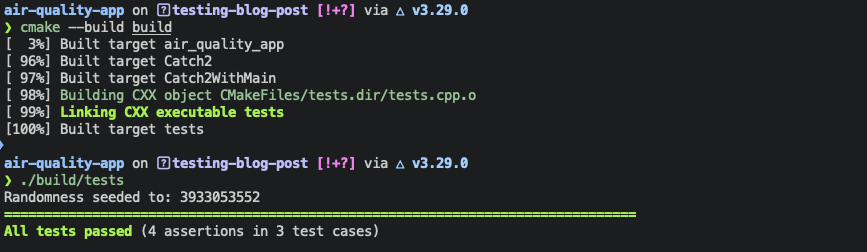
Kết quả xuất ra cho biết test pass/fail như hình:
Thiết lập GitLab CI/CD
Để tự động hóa chạy test khi đẩy code, tạo file .gitlab-ci.yml trong thư mục gốc với nội dung:
image: gcc:latest

variables:
 GIT_SUBMODULE_STRATEGY: recursive

stages:
 - build
 - test

before_script:
 - apt-get update && apt-get install -y cmake

compile:
 stage: build
 script:
   - cmake -S . -B build
   - cmake --build build
 artifacts:
   paths:
     - build/

test:
 stage: test
 script:
   - ./build/tests --reporter junit -o test-results.xml
 artifacts:
   reports:
     junit: test-results.xml
Thêm biến môi trường API_KEY trong GitLab project settings.
Commit, push các file lên branch mới:
git checkout -b tests-catch2-cicd
git add includes/functions.{h,cpp} tests.cpp .gitlab-ci.yml CMakeLists.txt main.cpp
git commit -vm "Add Catch2 tests and CI/CD configuration"
git push
Xem báo cáo kiểm thử
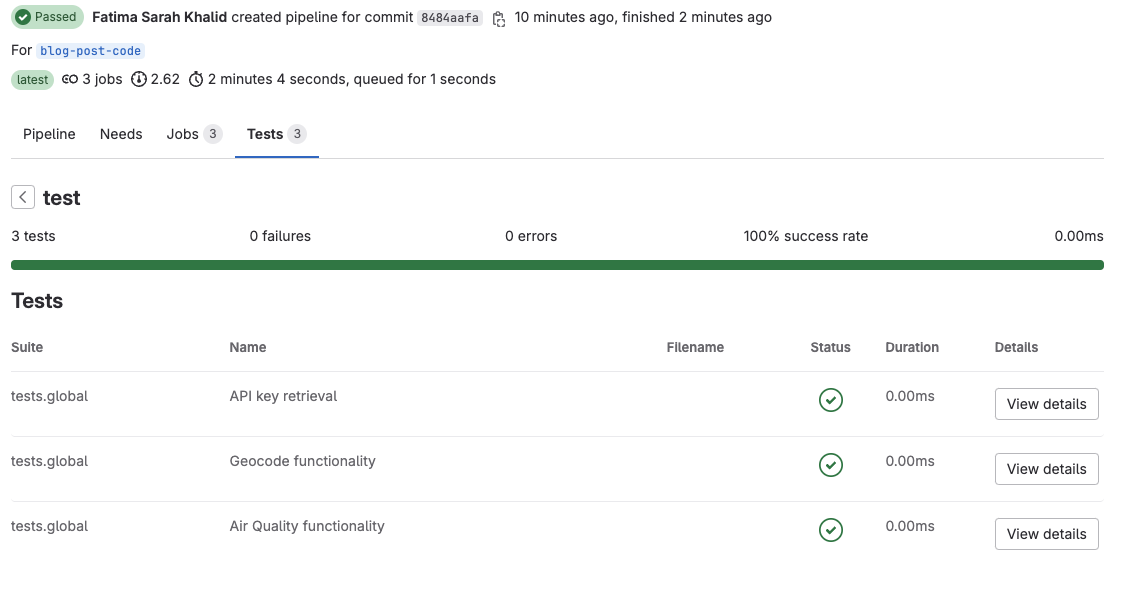
Sau khi push, xem kết quả test trong giao diện Pipeline trên GitLab trong tab Tests:
Mô phỏng lỗi kiểm thử
Để thấy cách hiển thị lỗi, chỉnh sửa hàm parseAirQualityResponse trong functions.cpp thay đổi AQI 2 thành “Poor” thay vì “Fair”:
case 2:
    aqiCategory = "Poor";
    break;
Thêm test kiểm tra kết quả phân tích AQI trong tests.cpp:
TEST_CASE("Parse Air Quality Response", "(airquality)") {
   std::string mockResponse = R"({"list": [{"main": {"aqi": 2}}]})";
   std::string result = parseAirQualityResponse(mockResponse);
   REQUIRE(result == "2 (Fair)"); // Test sẽ fail do bug
}
Commit, push và mở merge request để thấy lỗi test báo về UI GitLab:
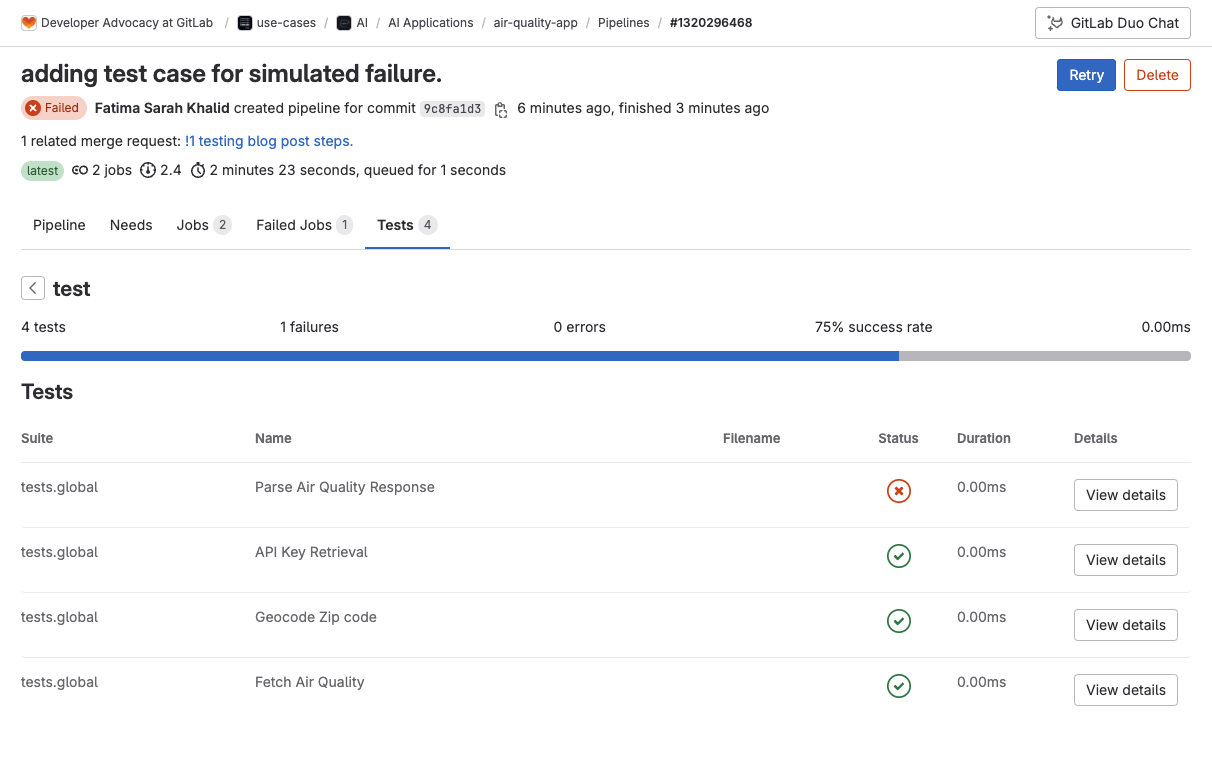
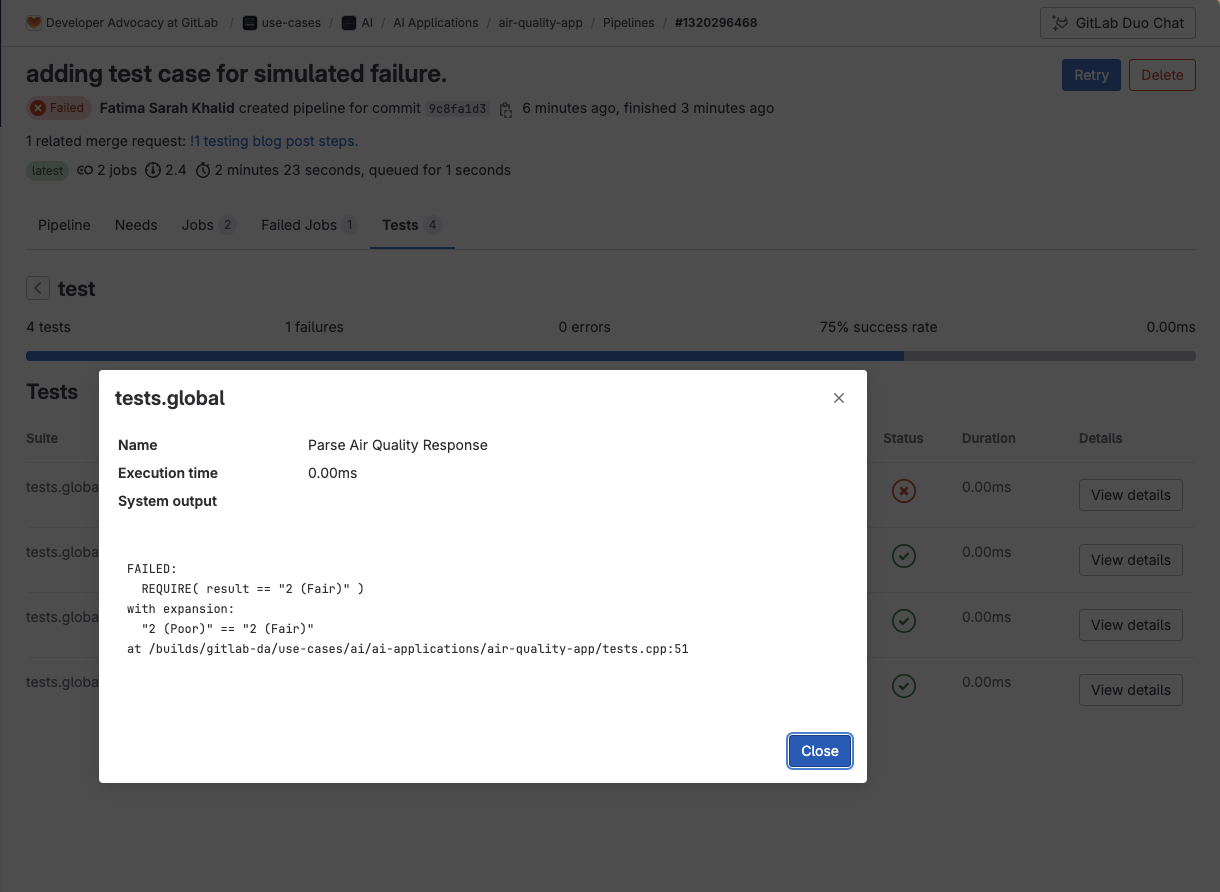
Sau khi kiểm tra, có thể dùng git revert để quay lại commit này.
Thêm và kiểm thử tính năng mới
Thêm tính năng lấy dự báo thời tiết hiện tại theo mã zip trong ứng dụng.
Định nghĩa struct Weather và prototype trong functions.h:
struct Weather {
   std::string main;
   std::string description;
   double temperature;
};

Weather getCurrentWeather(const std::string& apiKey, double lat, double lon);
Triển khai hàm getCurrentWeather trong functions.cpp (có thể dùng GitLab Duo hoàn thiện nhanh):
Weather getCurrentWeather(const std::string& apiKey, double lat, double lon) {
   std::string url = "http://api.openweathermap.org/data/2.5/weather?lat=" + std::to_string(lat) + "&lon=" + std::to_string(lon) + "&appid=" + apiKey;
   std::string response = httpRequest(url);
   auto json = nlohmann::json::parse(response);
   Weather weather;
   if (!json.is_null()) {
       weather.main = json["weather"][0]["main"];
       weather.description = json["weather"][0]["description"];
       weather.temperature = json["main"]["temp"];
   }
   return weather;
}
Cập nhật main.cpp để hiển thị dự báo thời tiết (chuyển Kelvin sang Celsius):
   Weather currentWeather = getCurrentWeather(apiKey, lat, lon);
   if (currentWeather.main.empty()) {
       std::cerr << "Unable to fetch weather data" << std::endl;
   } else {
       std::cout << "Current Weather: " << currentWeather.main << ", " << currentWeather.description
                 << ", temperature " << (currentWeather.temperature - 273.15) << " °C" << std::endl;
   }
Build và chạy ứng dụng để xác nhận hoạt động:
cmake --build build
./build/air_quality_app 90210
Kết quả mẫu:
Air Quality Index for Zip Code 90210: 2 (Poor)
Current Weather: Clouds, broken clouds, temperature 23.2 °C
Viết test kiểm thử tính năng thời tiết hiện tại:
TEST_CASE("Current Weather functionality", "(api)") {
   auto weather = getCurrentWeather("dummyApiKey", 40.7128, -74.0060);
   REQUIRE_FALSE(weather.main.empty());
   REQUIRE(weather.temperature > 0);
}
Cập nhật hàm mockHttpRequest trong tests.cpp để trả về dữ liệu thời tiết khi URL chứa từ khoá weather:
// Mock HTTP request function that simulates API responses
std::string mockHttpRequest(const std::string &url)
{
   if (url.find("geo") != std::string::npos)
   {
       return R"({"lat": 40.7128, "lon": -74.0060})";
   }
   else if (url.find("air_pollution") != std::string::npos)
   {
       return R"({"list": [{"main": {"aqi": 2}}]})";
   }
   else if (url.find("weather") != std::string::npos)
   {
       return R"({
          "weather": [{"main": "Clear", "description": "clear sky"}],
          "main": {"temp": 298.55}
      })";
   }
   return "{}";
}
Build và chạy test để xác nhận:
cmake --build build
./build/tests
Tất cả test, bao gồm test tính năng thời tiết, đều phải pass.
Tối ưu tests.cpp với sections
Catch2 hỗ trợ macro SECTION giúp cấu trúc các test khác nhau trong cùng một test case, thuận tiện quản lý và tái sử dụng setup.
Phân chia test theo 2 nhóm:
- Bước tiền xử lý: kiểm tra API key, geocode
- Lấy dữ liệu API: kiểm thử chất lượng không khí và dự báo thời tiết
Ví dụ cấu trúc tests.cpp:
#include "functions.h" #include#include // Mock HTTP request function std::string mockHttpRequest(const std::string &url) { if (url.find("geo") != std::string::npos) { return R"({"lat": 40.7128, "lon": -74.0060})"; } else if (url.find("air_pollution") != std::string::npos) { return R"({"list": [{"main": {"aqi": 2}}]})"; } else if (url.find("weather") != std::string::npos) { return R"({ "weather": [{"main": "Clear", "description": "clear sky"}], "main": {"temp": 298.55} })"; } return "{}"; } // Override httpRequest for testing std::string httpRequest(const std::string &url) { return mockHttpRequest(url); } TEST_CASE("Preprocessing Steps", "(preprocessing)") { SECTION("API Key Retrieval") { setenv("API_KEY", "test_key", 1); REQUIRE_FALSE(getApiKey().empty()); } SECTION("Geocode Functionality") { std::string apiKey = "test_key"; auto coordinates = geocodeZipcode("90210", apiKey); REQUIRE(coordinates.first == 40.7128); REQUIRE(coordinates.second == -74.0060); } } TEST_CASE("API Data Retrieval", "(data_retrieval)") { SECTION("Air Quality Functionality") { std::string apiKey = "test_key"; double lat = 40.7128, lon = -74.0060; std::string response = fetchAirQuality(lat, lon, apiKey); REQUIRE(response == R"({"list": [{"main": {"aqi": 2}}]})"); } SECTION("Current Weather Functionality") { auto weather = getCurrentWeather("dummyApiKey", 40.7128, -74.0060); REQUIRE_FALSE(weather.main.empty()); REQUIRE(weather.temperature > 0); } }
Build và chạy test để kiểm tra mọi thứ vẫn chuẩn xác.
Các bước tiếp theo
Bài viết đã hướng dẫn tích hợp kiểm thử đơn vị vào dự án C++ sử dụng Catch2 và thiết lập CI/CD với GitLab cho ứng dụng giám sát chất lượng không khí.
Bạn có thể tìm hiểu thêm tài liệu tại Catch2 documentation và GitLab Unit Test Report examples.
Để nâng cao hơn, bạn có thể mở rộng dự án với GitLab Duo để xây dựng tính năng phân tích dữ liệu chất lượng không khí lịch sử, cũng như thêm các kiểm tra chất lượng mã vào pipeline CI/CD.
Chúc bạn lập trình hiệu quả!
Hãy liên hệ với Softribution ngay hôm nay để được tư vấn chuyên sâu hoặc mua các giải pháp công nghệ tiên tiến phù hợp với doanh nghiệp của bạn!